OPEN SOURCE · SELF-HOSTED · MIT LICENCE
Fixed cameras and moving eyes,one platform to run them all.
Pull the cameras, encoders and alarm devices scattered across vendors and floors into a single platform: watch any feed, keep recordings on schedule, jump straight to the incident location — and when a fixed point is not enough, send a drone to look.
- protocol families
- 0
- capability domains
- 0
- web / desktop / server
- 0
- self-hosted deployment
- 0%
Device onboarding
Mainstream cameras, encoders and drone flight controllers all plug in — the hardware you already own keeps working.
GB28181
The common way mainland cameras and encoders join a platform: register once, and they are managed.
ONVIF
Discovers cameras on the network automatically, with PTZ movement, zoom and two-way talk.
RTSP
Anything that can push a stream connects directly, covering most third-party vendors.
WebSocket
Alarms and device status reach the console in real time, with no manual polling.
MAVLink
Drone flight control joins the platform, bringing position, attitude and onboard video with it.
Core capabilities
From onboarding to evidence, in one platform
No more hopping between systems, and no separate build for every vendor.
Live video
Watch several feeds at once and zoom into the one that matters.
- ▸Single and multi-view layouts
- ▸Adaptive playback formats
- ▸See who is watching and for how long
Device onboarding
Cameras from every vendor and protocol land in one list — a new device only needs an address.
- ▸Automatic discovery and registration
- ▸Grouping by area and purpose
- ▸Per-channel online status
PTZ control
Turn, zoom and recall presets from the map or from the picture itself.
- ▸Pan, tilt and zoom
- ▸One-click recall of key positions
- ▸Automatic recovery after an outage
Electronic map
Every point on one map: open it to see the picture, and find an incident location at a glance.
- ▸Clustered markers stay readable
- ▸Pick coordinates directly on the map
- ▸Filter by online status
Recording & playback
Recordings are kept on schedule and pulled back by time and channel when needed.
- ▸Automatic recording per zone and window
- ▸Parallel multi-channel playback
- ▸Fast jump to key moments
Streaming cluster
More cameras do not mean stutter: work is spread by load and a single failure changes nothing.
- ▸Automatic scheduling across media servers
- ▸Failover on failure
- ▸Status visibility and manual control
MOBILE EYE
Fixed cameras watch what matters; the mobile eye watches what moves.
A drone is not "a camera that flies": it carries its own flight control and decides where to look, how to look and when to return. RustCam pulls that flight capability into the surveillance domain — live position on a 3D globe, route planning, geofences and flight commands share the same recording, evidence chain and video wall as fixed cameras.
No new fixed points
Dispatch only when it is needed: no cabling, no poles, no permanent points, and coverage that grows on demand instead of being buried in advance.
No scenario lock-in
Routes, geofences and alarm rules are composed by configuration; patrol, blind-spot coverage and emergency response are templates of one capability set.
- Mainstream flight controllers out of the box
- Live position and attitude on a 3D globe
- Route planning and automatic execution
- Geofences with breach alarms
- Automatic onboard camera streams
- No conflicts between operators
- Full flight log trail
- Built-in simulator — no hardware needed
- HDG
- 000°
- ALT
- 0 m
- BAT
- 0%
- DIST
- 0 m
Flight control decides where to look: position, attitude, routes and geofences on a 3D globe
System architecture
One backend for every device
Fixed cameras and drones share the same backend, the same recordings and the same permissions and alarms — the device type changes, the way you work does not.
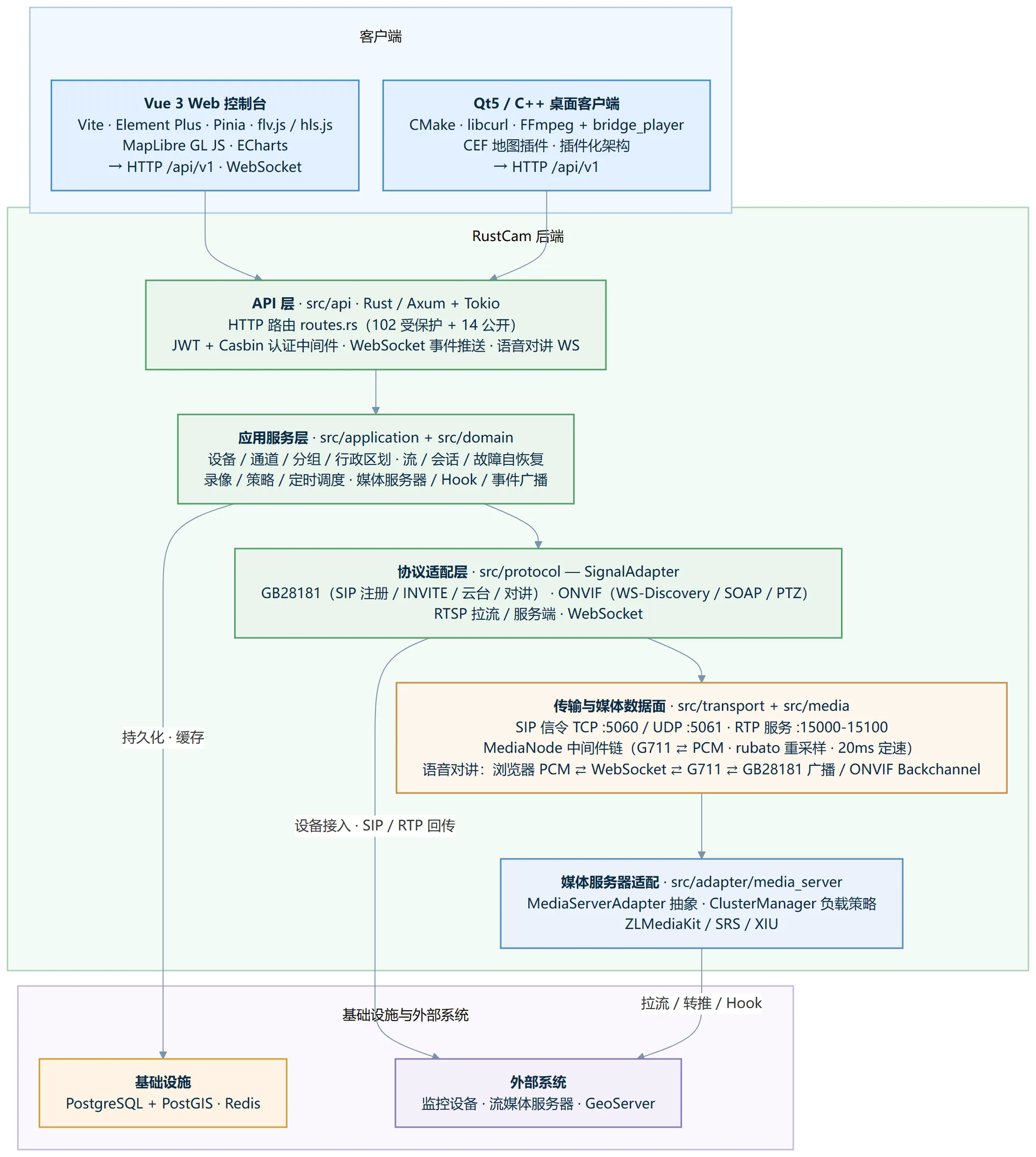
One device list
Cameras from any vendor or protocol appear as a single inventory, and onboarding a new device never means rewriting business logic.
One evidence chain
Footage and events from fixed cameras and drones land on the same timeline, so investigations never need to stitch sources together.
Scale on demand
From one device to thousands of concurrent streams, the media tier runs as a cluster while operations stay the same.
Interface preview
Web console and desktop client
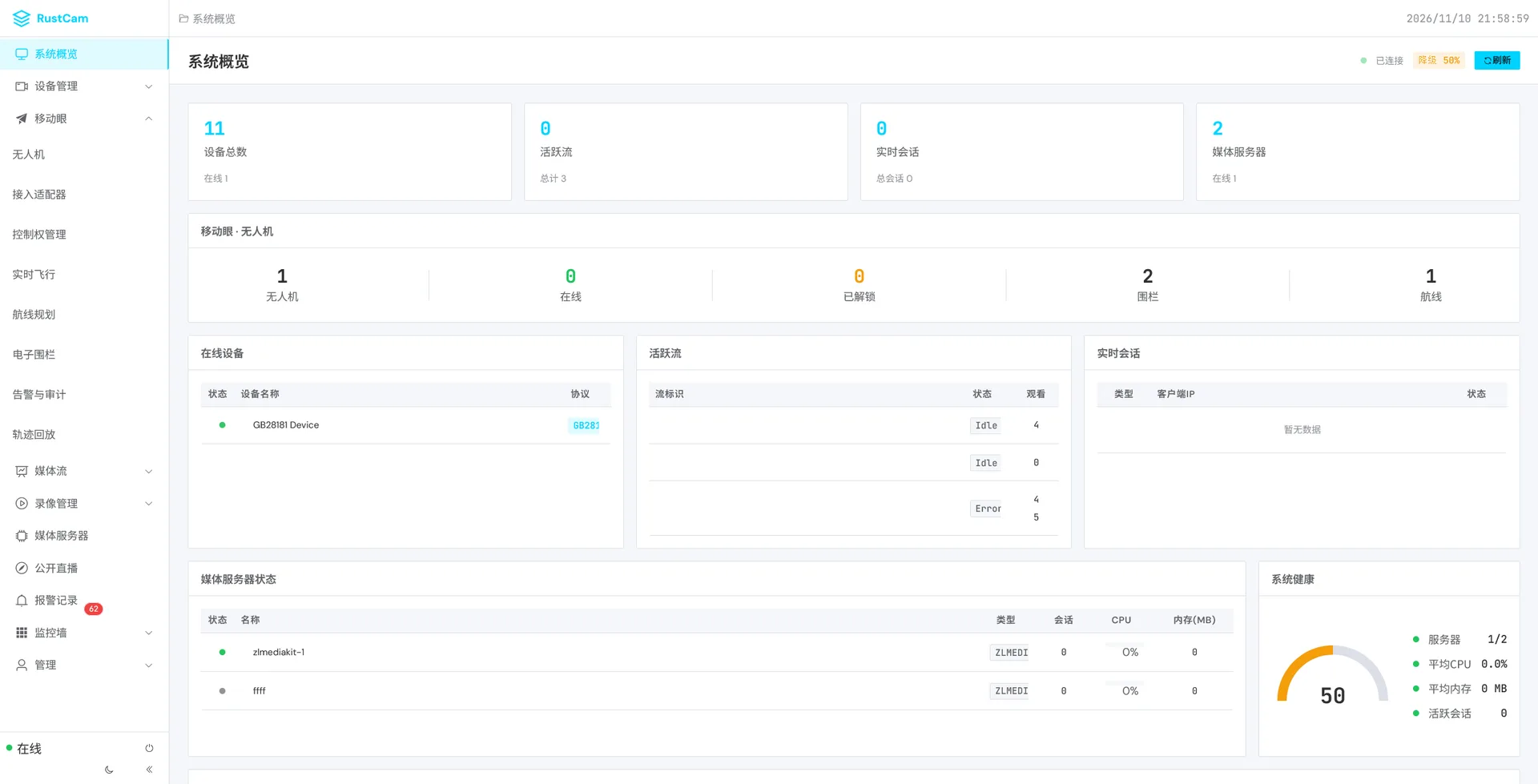
Every screenshot below comes from a real running instance — click to zoom.
Web console
Mobile Eye console
Qt desktop client
Scenarios
From a campus to a city
Pull scattered cameras, encoders and alarm devices into one operable platform.
Campus security
Onboard cameras from any vendor, and locate incidents fast with the map and the video wall.
City operations
Aggregate regional video resources into one platform and take cross-domain access online.
Industrial safety
Separate permissions between production floors and offices, and close the loop on every alarm.
Transport hubs
High-concurrency live channels, with recording policies driven by time schedules.
Quick start
Take over your surveillance in three steps
Run it on your own server and keep the data where it belongs.
Clone the source
git clone https://gitee.com/ouliuying/rustcam.git
cd rustcamPrepare database and cache
psql -U postgres -c "CREATE DATABASE rustcam;"
psql -U postgres -d rustcam -f sql/schema.sqlBuild and run
cargo build --release -p rustcam-server
./target/release/rustcam-media
Start the web console
cd frontend
npm install
npm run dev
A Qt desktop client is available for on-site operators — see the developer docs for the full setup.
Why choose it
Self-hosted, in your control, ready to grow
No per-channel subscription, and your footage never leaves your infrastructure.
Self-hosted
- ·All data stays on your own server
- ·Runs inside the intranet, no public network needed
- ·Reverse proxy and HTTPS supported
Ready out of the box
- ·One console for web and desktop
- ·Mainstream device protocols supported
- ·Built-in test environment — no real hardware needed
Built to last
- ·MIT licensed and open source
- ·Modular design, extend the device types you need
- ·Start on one box, scale to a cluster without changing habits
Bring your surveillance back into one platform
Open source, MIT licensed and fully documented. Read the docs to evaluate it, or clone the source and run it in your own environment.